
Deploy Pull Model Instead of GitHub Matrix: Updating Multiple Client Sites with Queuing
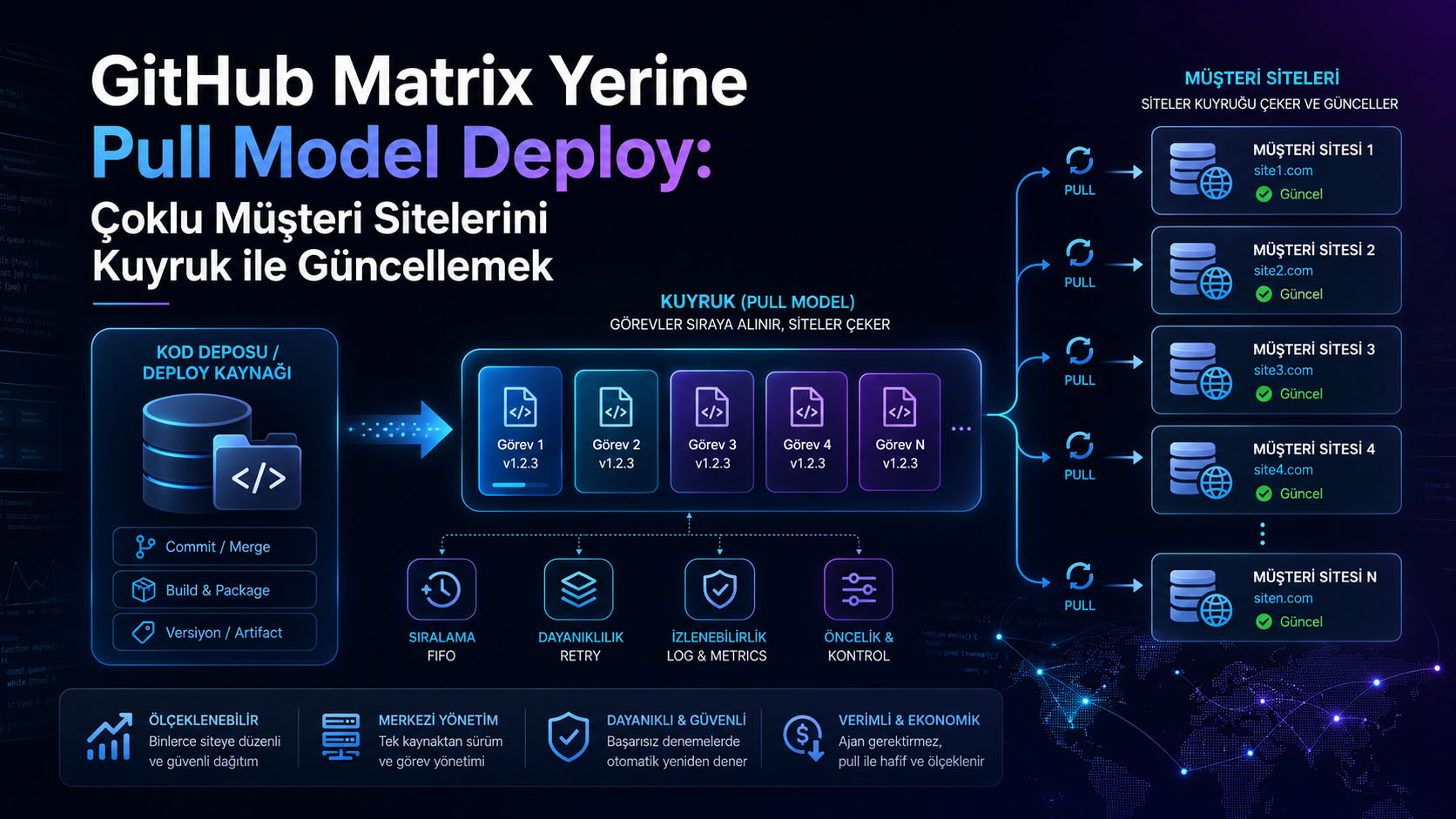
One common problem in a SaaS or multi-client site structure is this:
How can I securely and controllably roll out a change I made to the main project to all client sites using the same infrastructure?
The first solution that usually comes to mind is GitHub Actions matrix deployment. For example, separate deployment steps are run within the GitHub workflow for each client site or each server. This can work for small structures, but it becomes more difficult to manage as the number of clients increases.
In this article, we will consider an alternative approach:
Merkez Deploy Sistemi ↓ Deploy Kuyruğu ↓ Sunucu Agent'ları ↓ Müşteri Siteleri So GitHub doesn't connect to each client site individually. Instead, a queue is created in the central system. A small agent running on each server regularly queries the central system:
Do I have any update tasks to do?
If there's a job available, they take it on and update the client sites on their own server sequentially.
Problem
Let's imagine we have the following structure:
/var/www/main-app /var/www/customer-a /var/www/customer-b /var/www/customer-c Let main-app be the source project for all customer sites. customer-a , customer-b , and customer-c are customer sites using the same codebase.
When we make a change to the main project, we want to transfer these changes to all customer folders. But we have some important requirements:
- The contents of the customer database must be protected.
- Client-specific files such as .env , storage , and uploads should not be deleted.
- Updates shouldn't be released all at once; they should be implemented sequentially.
- It should be possible to track which sites have been updated and which have experienced errors.
- Multiple VPS servers should be supported in the future.
Why is GitHub not The Matrix?
A structure like this can be built using GitHub matrix:
strategy: matrix: server: - host: server-1.example.com - host: server-2.example.com - host: server-3.example.com In this approach, GitHub Actions connects to each server and performs the deployment.
However, as the number of customers grows, some disadvantages arise:
- The GitHub workflow file gets bloated with server/client lists.
- Deploy control remains with GitHub.
- SSH access to each server is managed via GitHub.
- A load may occur simultaneously on 50-100 customer sites.
- Retrying and reporting becomes more difficult in case of an error.
- Additional infrastructure is needed at the central office to keep track of "which customer is in which situation?".
Therefore, the pull model is a more controlled alternative.
What is Pull Model?
In the pull model, the central system does not connect to the servers. Conversely, the agent running on each client server connects to the central system.
Agent -> Merkez: Bana ait iş var mı? Merkez -> Agent: Evet, customer-a sitesini güncelle. Agent -> Kendi sunucusu: /var/www/main-app içeriğini /var/www/customer-a içine uygula. Agent -> Merkez: İş tamamlandı veya hata aldı. The advantages of this model are:
- They don't need to open SSH to the central servers.
- Each server only loads its own content.
- Firewall/NAT issues are reduced.
- Tasks can be carried out sequentially.
- Centralized reporting is possible.
- Structures like 10 servers and 100 clients are easier to scale.
Examples of Architecture
Let's think of it as a demo:
Merkez uygulama: https://deploy.example.com Ana kaynak proje: https://github.com/demo-org/main-app Sunucu: server-1 Sunucu içindeki klasörler: /var/www/main-app /var/www/customer-alpha /var/www/customer-beta The central database may contain the following tables:
customer_servers customer_sites customer_site_deploy_batches customer_site_deploymentscustomer_servers
They represent the servers.
Example:
id: 1 slug: server-1 base_path: /var/www status: activecustomer_sites
It represents client websites.
Example:
id: 10 domain: https://customer-alpha.com folder_name: customer-alpha customer_server_id: 1 The customer_server_id here indicates which VPS this site is hosted on.
customer_site_deploy_batches
It represents a deployment operation.
Example:
uuid: 81c7... source_ref: 9f2a1cd status: running total_sites: 2 completed_sites: 1 failed_sites: 0customer_site_deployments
Each client site maintains a separate deployment job.
Example:
batch_id: 1 customer_site_id: 10 status: pending attempts: 0What does GitHub Workflow do?
The GitHub workflow simply deploys the main project live and then creates a queue in the central system.
Example:
- name: Deploy main app run: | rsync -avz ./ deploy@server:/var/www/main-app/ - name: Queue customer site updates run: | ssh deploy@server << EOF cd /var/www/deploy-center php artisan customer-sites:queue-deploy-updates --source-ref=${{ github.sha }} EOF The important point here is this:
php artisan customer-sites:queue-deploy-updates --source-ref= ${{ github.sha } } This command does not directly update client sites. It only creates a deployment queue on the central system.
What does an agent do?
The agent running on each server does the following:
1. Merkeze sorar: Bana ait bekleyen iş var mı? 2. İş varsa alır. 3. Gerekirse /var/www/main-app klasörünü git pull ile günceller. 4. Kaynak kodu müşteri klasörüne rsync ile aktarır. 5. composer install çalıştırır. 6. php artisan migrate --force çalıştırır. 7. cache temizler. 8. Sonucu merkeze bildirir. Example agent variables:
LICENSES_AGENT_URL= "https://deploy.example.com" LICENSES_AGENT_SERVER= "server-1" LICENSES_AGENT_TOKEN= "secret-agent-token" SOURCE_PATH= "/var/www/main-app" BASE_PATH= "/var/www" POLL_INTERVAL= "30" UPDATE_SOURCE= "0" USE_SUDO= "0"What are variables used for?
LICENSES_AGENT_URL This is the address of the central deployment system.
LICENSES_AGENT_SERVER This is the server's identity at the central office. For example, server-1 .
LICENSES_AGENT_TOKEN This is the token the agent uses to authenticate themselves to the central office.
SOURCE_PATH This is the folder where the main, up-to-date code is located.
BASE_PATH This is the main directory where customer folders are located.
POLL_INTERVAL Specifies how often the agent will contact the center, in seconds.
UPDATE_SOURCE If it's 1 , the agent first performs a git pull .
If it's 0 , it uses the current source folder.
In a single-server environment, if GitHub is already updating the /var/www/main-app folder, then usually the following is sufficient:
UPDATE_SOURCE= "0" If each server on different VPSs is going to pull its own source code from GitHub:
UPDATE_SOURCE= "1" available.
Why use Rsync?
When transferring the code to the client folder, it's necessary to protect certain files.
Example:
rsync -a --delete \ --exclude= '.env' \ --exclude= '.git/' \ --exclude= 'storage/' \ --exclude= 'bootstrap/cache/' \ --exclude= 'public/uploads/' \ --exclude= 'public/storage/' \ --exclude= 'node_modules/' \ --exclude= 'vendor/' \ " $SOURCE_PATH /" " $TARGET_PATH /" The aim here is:
- Updating code files
- Protecting the customer's private .env file.
- Do not delete uploaded files.
- Do not overwrite the storage contents.
- Re-establishing the vendor folder on the customer side.
Working with a Supervisor and Agent
A supervisor can be used to ensure the agent's continuous operation.
Example configuration:
[program:deploy-agent] process_name =%(program_name)s command =/bin/bash /var/www/deploy-center/customer-deploy-agent.sh directory =/var/www/deploy-center autostart = true autorestart = true user =www-data redirect_stderr = true stdout_logfile =/var/www/deploy-center/storage/logs/deploy-agent.log stopwaitsecs = 3600 environment =LICENSES_AGENT_URL= "https://deploy.example.com" ,LICENSES_AGENT_SERVER= "server-1" ,LICENSES_AGENT_TOKEN= "secret-token" ,SOURCE_PATH= "/var/www/main-app" ,BASE_PATH= "/var/www" ,POLL_INTERVAL= "30" ,UPDATE_SOURCE= "0" ,USE_SUDO= "0" To activate:
sudo supervisorctl reread sudo supervisorctl update sudo supervisorctl restart deploy-agent Log monitoring:
tail -f /var/www/deploy-center/storage/logs/deploy-agent.logDeploy Order
The full flow would be as follows:
1. Developer GitHub'a push yapar. 2. GitHub Actions main-app klasörünü günceller. 3. Workflow merkez sisteme deploy kuyruğu oluşturur. 4. Agent merkeze “iş var mı?” diye sorar. 5. Merkez sıradaki müşteri sitesini döner. 6. Agent siteyi günceller. 7. Composer, migrate ve cache işlemleri çalışır. 8. Sonuç merkeze yazılır. 9. Agent sıradaki işe geçer.Why the queue?
Updating 10 client sites simultaneously is risky on small servers.
The following processes, in particular, put a load on the system:
composer install php artisan migrate php artisan optimize:clear rsync --delete The queue allows things to progress in order:
customer-alpha -> completed customer-beta -> running customer-gamma -> pending This also makes the server load more controlled.
Logging and Reporting
The following information can be stored for each deployment:
status attempts assigned_at started_at heartbeat_at finished_at output error_message Thus, the following questions can be answered by the panel:
- Which site has been updated?
- Which site experienced the error?
- Is the error in Composer, Migration, or RSync?
- When did the agent last connect to the center?
- Which GitHub commit was deployed?
Points to Consider
1. Token Security
The agent token should only be stored on the server side. It should not be written to the client site's .env file.
Correct location:
/etc/supervisor/conf.d/deploy-agent.conf Wrong place:
/var/www/customer-alpha/.env2. Git Pull Permission
If the agent is running with UPDATE_SOURCE=1 , the relevant user should be able to access GitHub.
For example, if the agent works with www-data :
sudo -u www-data git -C /var/www/main-app pull --ff-only The command must be successful.
If GitHub asks for a username, you need to configure a deploy key or SSH remote.
3. Safe Directory Error
Git can sometimes give this error:
fatal: detected dubious ownership in repository Solution:
sudo -u www-data git config --global --add safe.directory /var/www/main-app4. Composer HOME Error
When working with www-data using Composer, you may encounter the following error:
The HOME or COMPOSER_HOME environment variable must be set Solution:
export COMPOSER_HOME=/tmp/composer-www-data This can be configured within the agent script.
Conclusion
GitHub matrix deployment can be useful for small environments, but for multi-tenant environments, a centralized queue and pull model offers a more controlled solution.
Thanks to this structure:
- GitHub only triggers the main deployment.
- The central system manages the deployment queue.
- Each server pulls its own content.
- Client websites are updated sequentially.
- A logging and reporting center will be created.
- It will scale more easily to structures like 10 servers and 100 clients in the future.
Briefly:
GitHub deploy eder. Merkez sıraya koyar. Agent çeker. Sunucu kendi müşterilerini günceller. Merkez sonucu raporlar. This approach makes multi-site updates more secure, traceable, and scalable while protecting customer data.
Keywords: Ferhat Gölge, homepage, portfolio, blog, Laravel, software developer
Frequently Asked Questions
What is Pull Model Deploy?
Pull Model Deploy is a deployment approach where each customer site pulls and implements its own update task, instead of sending deployments directly from a central source to customer sites. In this model, updates are placed in a queue, and sites check this queue at the appropriate time to initiate their own update.
Why isn't GitHub Actions Matrix deploying always ideal?
GitHub Actions Matrix can be practical for a small number of target environments. However, as the number of client sites increases, initiating a separate deployment process for each site can become challenging in terms of time, resource usage, error handling, and traceability. In environments with hundreds of client sites, a centralized queue-based approach may be more manageable.
What are the advantages of updating multiple client sites with a queue?
Thanks to the queuing structure, updates can be placed in a queue, failed operations can be retried, prioritization can be performed, and it is easier to track which site is on which version. This provides a more secure deployment process, especially in SaaS, multi-client panel, or duplicate site architectures.
Is Pull Model Deploy safe?
If designed correctly, it is a secure model. Each client site should only pull update tasks for which it is authorized. This requires the use of security layers such as API tokens, domain verification, IP verification, signed artifact files, version control, and logging.
Which projects is this model suitable for?
Pull Model Deploy is suitable for multiple client sites, reseller panels, franchise structures, white-label SaaS systems, or multiple Laravel/Symfony projects built from the same codebase. For a single site or small-scale projects, a classic deployment via GitHub Actions may suffice.